Marketing Teams Work Together. Now STRATUM Does Too.
I shipped team collaboration features in alpha with <50 users because my customers were already working in teams—just through painful screenshots and copy-paste workarounds that cost 80+ hours per year.
"You're still in alpha. Why are you building team features?"
Fair question. I have less than 50 users. Most SaaS founders would be laser-focused on getting to 100 users before thinking about teams.
But here's what I realized watching my alpha users: they weren't working alone. The marketing director was sharing screenshots with her CEO. The agency owner was copy-pasting AI outputs into WhatsApp for his friends. The founder was forwarding emails to his wife.
Coming from 18 years in advertising, this shouldn't have surprised me. Marketing is never a solo activity. I've watched entire agency floors operate through a chaotic mix of Slack threads, email forwards, and "can you screenshot that for me?" requests. It's how teams actually collaborate — and it's painful. So when I saw the same patterns showing up in my alpha, I knew I couldn't ignore it.
So I built team collaboration. In alpha. While "smarter" founders would have waited. :P
Here's what I shipped, why I built it this way, and what I learned along the way:
1. Right Access for Everyone — 15 roles designed for how SME and Agency teams actually work, with client-level isolation for agencies
2. Work Together Without the Back-and-Forth — Approvals, comments, tasks, and notifications replace your "did you see my message?" Slack threads
3. New Hires Productive Immediately — Invite → assign role → they're working. 30 seconds, not 3 days.
Here's what shipped, why it matters for your team, and the decisions that made it work.
---
The Real Cost of "Just Share Your Login"
Before these features, here's how teams were using STRATUM:
Option A: Share credentials (security nightmare)
- Everyone uses the same login
- No idea who did what
- One person changes the password, everyone's locked out
Option B: Separate accounts (expensive and fragmented)
- Each person pays separately
- AI outputs live in different accounts
- "Can you export that strategy and send it to me?"
Option C: Screenshot and paste (the reality)
- One person runs the AI agents
- Screenshots or copy-pastes to teammates
- Context gets lost, formatting breaks, nobody can build on the work
None of these are real collaboration. They're workarounds.
The business cost? I watched one agency owner spend 20 minutes per day just moving AI outputs between tools—forwarding emails, reformatting in Google Docs, re-explaining context to teammates who couldn't see the original conversation.
That's 80+ hours per year. For one person. On one team.
---
Feature 1: Give Everyone the Right Access—Without the IT Headache
After 18 years on the agency side, I know exactly how marketing teams work: different people need different access to different things.
Your senior strategist works on Client A and Client B. Your junior analyst is learning on smaller accounts. Your freelance creative only touches the clients they're assigned to. And absolutely nobody should see client data they're not supposed to see.
This isn't about cost control (though that matters too). It's about how teams actually operate.
Two Permission Models: SME vs Agency
I learned pretty early that a 3-person startup and a 15-person agency have completely different workflows. Trying to force them into one permission model would have been a mess — I've seen enterprise tools do this, and it always ends with small teams drowning in complexity while large teams don't have enough control. So I built two distinct models.
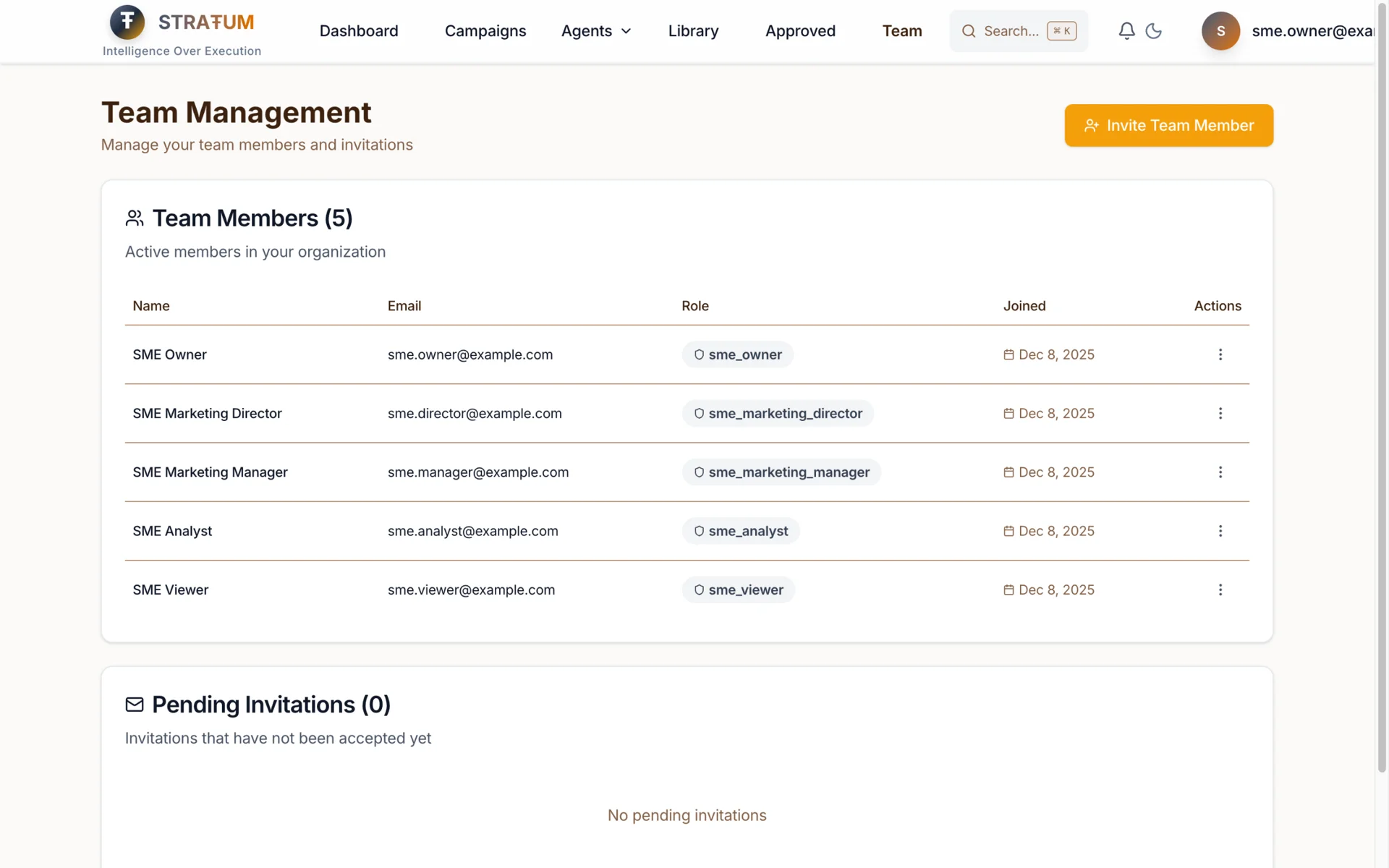
SME Roles (5 Roles)
For small-to-medium businesses with simpler hierarchies:
| Role | Agent Access | Campaign Access | Team Management |
|------|-------------|-----------------|-----------------|
| Owner | All 8 agents | Full access (create, edit, run, archive) | Invite, manage, remove |
| Marketing Director | Strategy, Persona, Content, Quick Wins (4) | Create, edit, run campaigns | View team only |
| Marketing Manager | Execution, Content, Quick Wins (3) | Create, edit, run campaigns | None |
| Analyst | Performance Intelligence (1) | View only | None |
| Viewer | None (read-only) | View only | None |
Why these five? I mapped the actual roles I saw in SME marketing teams. The Owner who does everything. The Director who sets strategy. The Manager who executes. The Analyst who measures. The VA or bookkeeper who just needs to see what's happening.
Agency Roles (10 Roles)
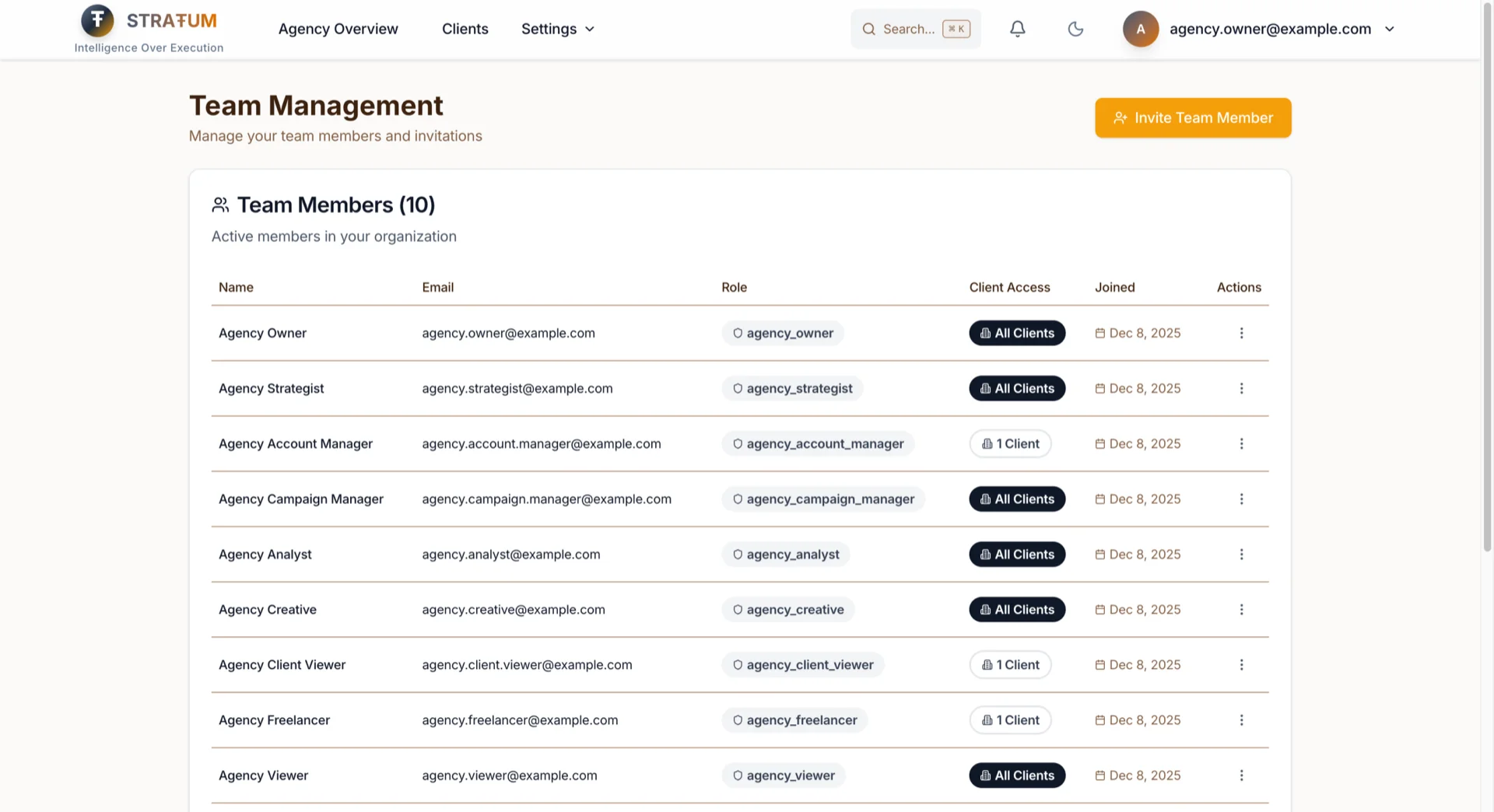
For agencies managing multiple clients with complex team structures:
| Role | Agent Access | Client Scope | Key Permissions |
|------|-------------|--------------|-----------------|
| Owner | All 9 agents | All clients | Full control, billing |
| Admin | All 9 agents | All clients | Team management, no billing |
| Strategist | 8 agents (no Client Success) | All clients | Strategy, campaigns |
| Account Manager | All 9 agents | Assigned only* | Full access for their clients |
| Campaign Manager | Quick Start, Content, Campaign (3) | All clients | Execution focus |
| Analyst | Performance Intelligence (1) | All clients | Analytics, exports |
| Creative | Content (1) | All clients | Content creation only |
| Client Viewer | None | Assigned only* | Read-only for clients |
| Freelancer | Content (1) | Assigned only* | Limited scope, temporary |
| Viewer | None | All clients | Read-only everywhere |
Client-scoped roles
are the game-changer for agencies. When you assign an Account Manager to Client A, they literally cannot see Client B's data. Not "hidden in the UI"—enforced at the database level.
Client Assignment Management
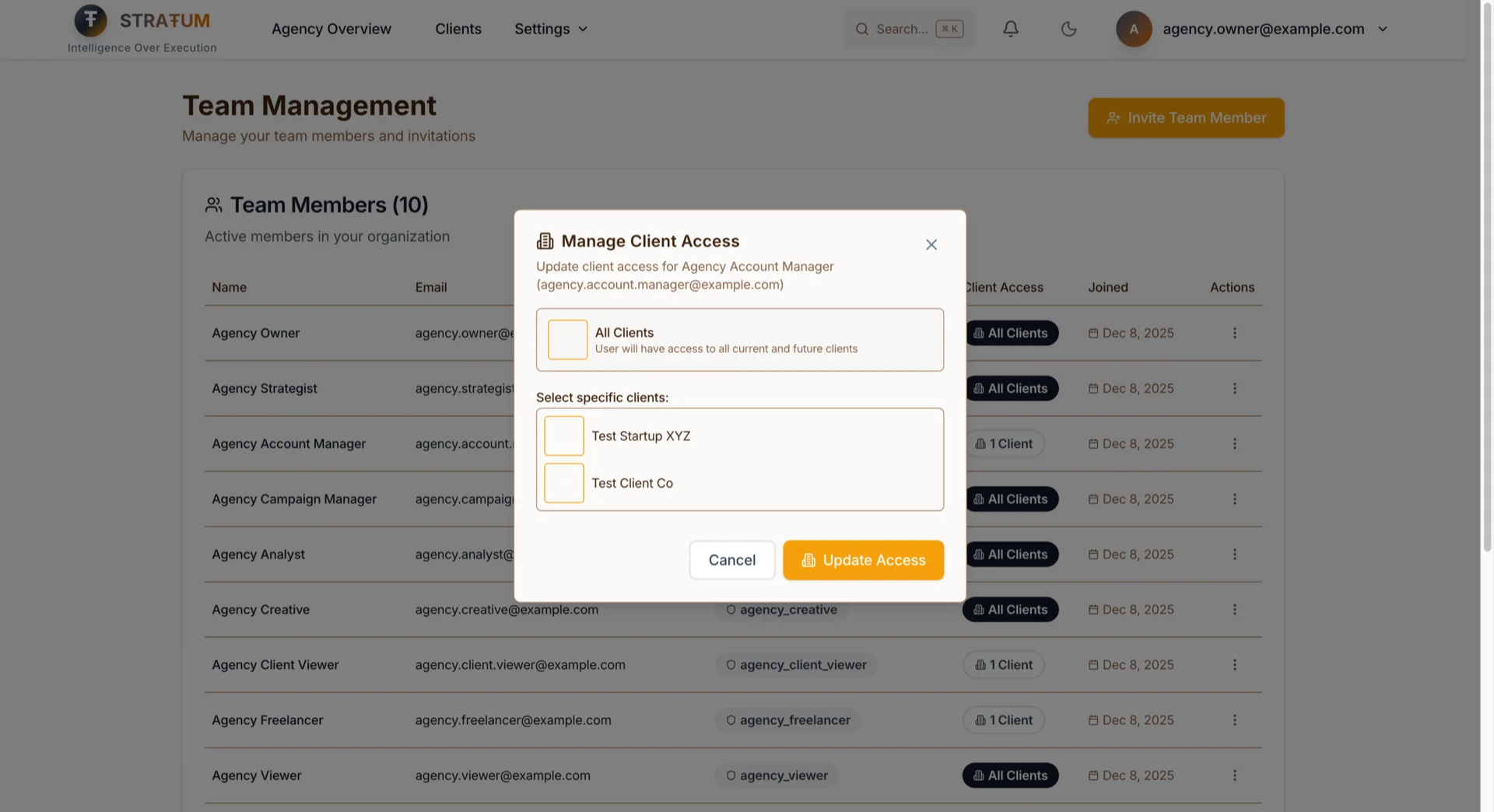
For agency teams, the Team Management page now shows a Client Access column that tells you at a glance which clients each team member can access. Click the actions menu on any team member to:
- Grant "All Clients" access: New clients automatically become visible to them
- Assign specific clients: Pick exactly which clients they should see
- Update assignments anytime: Change access as your client roster evolves
This means your Account Manager for Client A literally cannot see Client B's dashboard, campaigns, or AI outputs—even if they try. The filtering happens at the database level, not just the UI.
For onboarding new team members: When you invite someone, you choose their role AND their client scope in the same flow. No separate steps. No forgetting to restrict access.
The Permission-Aware UI
Here's what makes this actually usable: the UI adapts to your role.
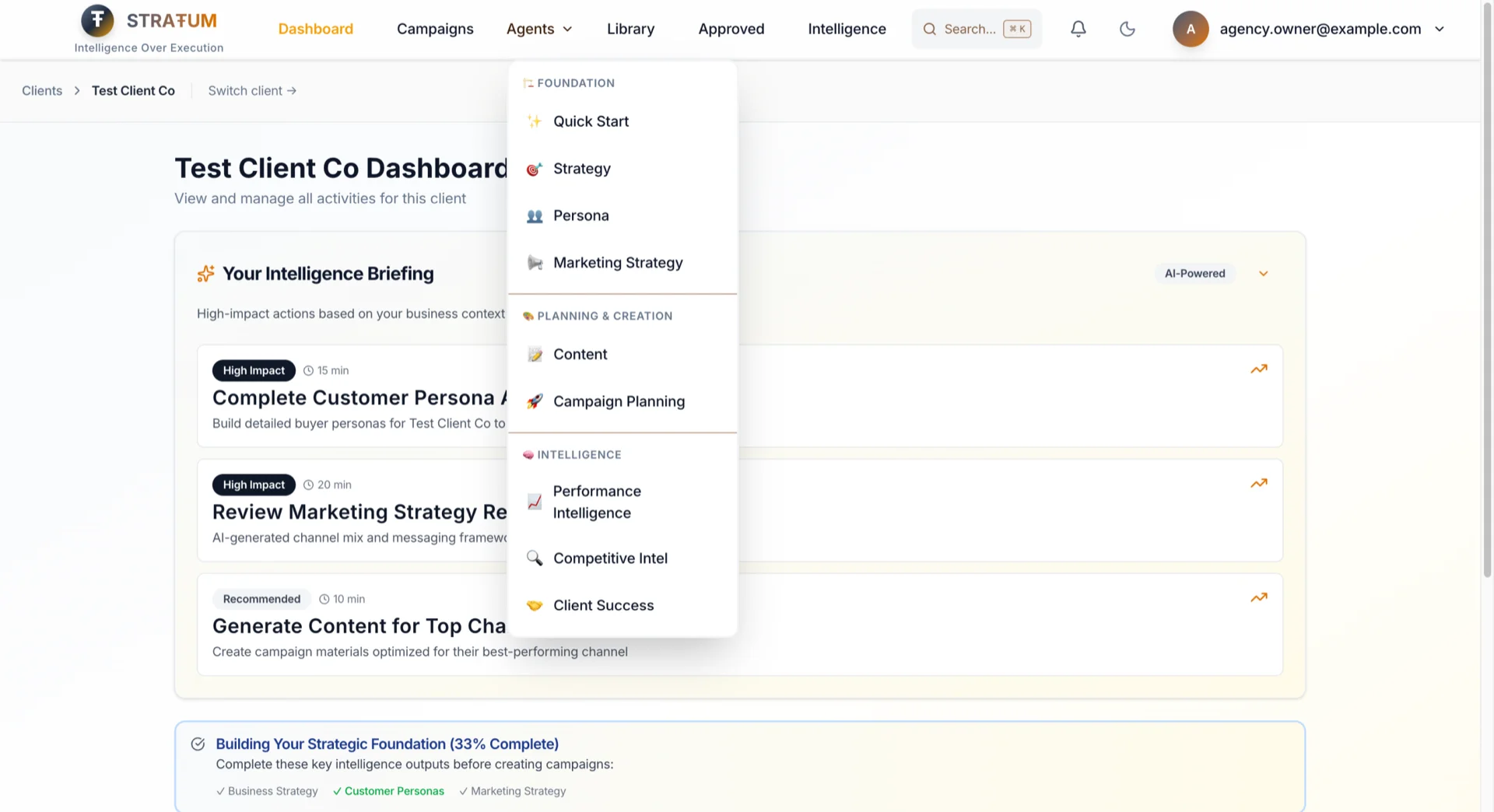
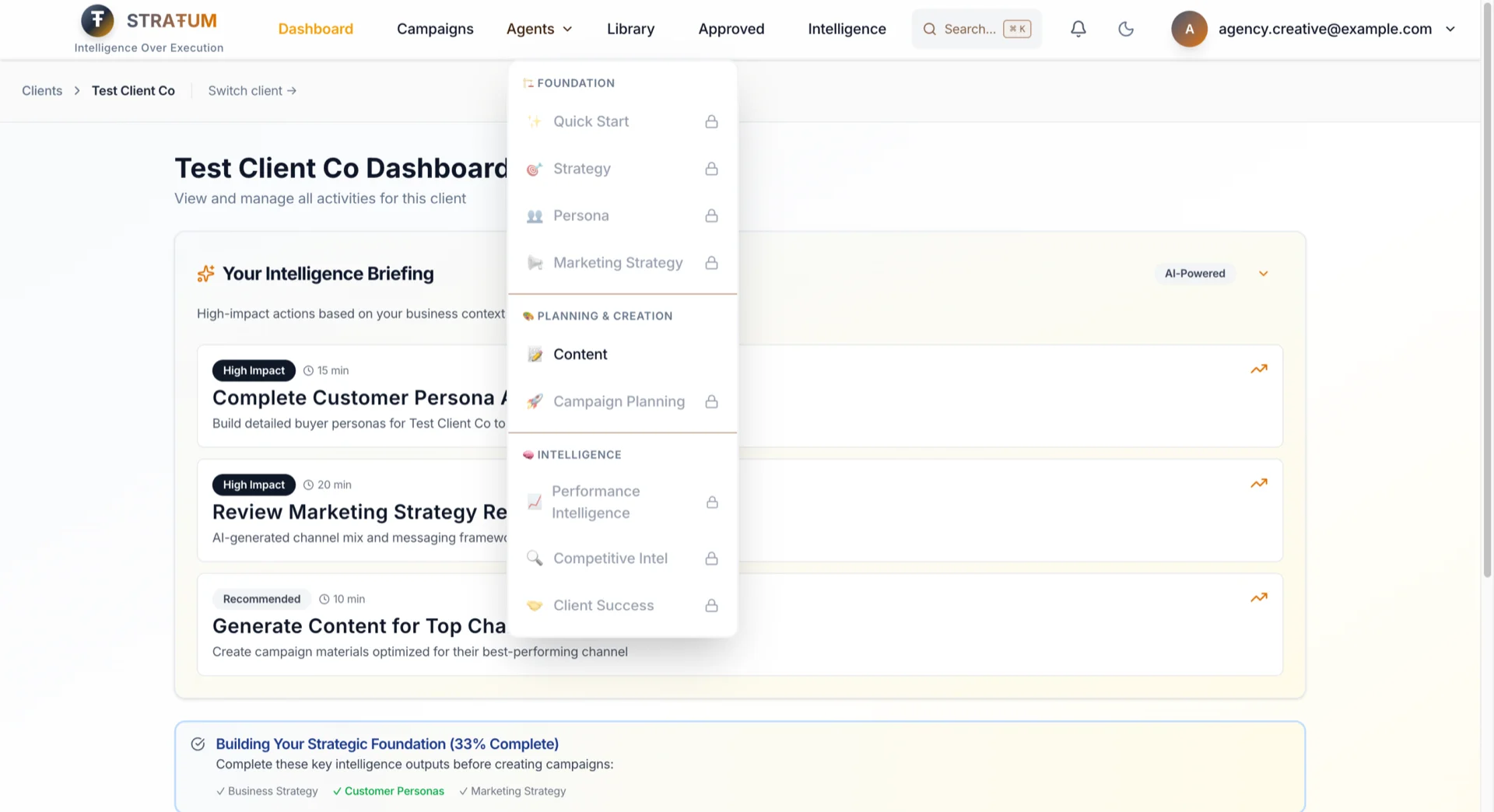
If you can't invite team members, you don't see the Team settings. If you can't access a client, that client doesn't appear in your dashboard. If you can't run an agent, it appears locked with a clear indicator.
No more clicking options only to get an error. No more "why can I see this but not do anything with it?" confusion.
For Agency Directors: Your creatives see a clean, focused interface—only their tools. Less training, fewer mistakes.
For Founders: Your viewer-role VA sees a simplified dashboard. They can find and copy what they need without getting overwhelmed.
37 Granular Permissions (You Won't Need to Touch)
Behind these roles are 37 individual permissions—but you'll never have to configure them manually. Each role comes pre-configured based on how marketing teams actually work:
| Category | Why It Matters |
|----------|----------------|
| AI Agents (9) | Your Creative can't accidentally run Strategy agent on the wrong client |
| Campaigns (6) | Analysts can view campaigns to report on them, but can't accidentally archive one |
| Clients (5) | Only Owners and Admins can add new clients—no accidental data sprawl |
| Analytics (3) | Everyone can see basic stats; only analysts can export raw data |
| Documents (3) | Protect sensitive uploads—VAs can view but not delete |
| Organization (4) | Billing access limited to Owners—no "who changed our plan?" surprises |
| Team (3) | Managers can't invite their friends without Owner approval |
| Workspace (2) | Keep workspaces organized without everyone creating new ones |
| Admin (2) | System functions reserved for people who know what they're doing |
Each role gets exactly what they need to do their job—nothing more, nothing less. You set the role once; permissions follow automatically.
---
Feature 2: Stop Chasing Screenshots and Slack Threads
This is the feature I'm most personally invested in. Permissions control who can do what, but collaboration is about how they work together — and from my experience, the back-and-forth is what actually eats your day. I've lived this problem for two decades on the agency side :D
Shared Campaigns & AI Outputs
The old model: Your campaigns. Your AI outputs. Your silo.
The new model: Organization-scoped collaboration.
When your strategist runs the Persona Agent, that persona belongs to the organization—not to their personal account. Now your copywriter can:
- See the persona without asking for a screenshot
- Reference it when running the Content Agent
- Build on it instead of starting from scratch
When your analyst generates a competitive analysis, your Marketing Director can review it directly—not through a forwarded PDF.
Approval Workflows
Content doesn't just get created—it gets reviewed and approved before going live.
| Workflow | Requester | Approver(s) | Use Case |
|----------|-----------|-------------|----------|
| SME Campaign Launch | Manager | Director → Owner | Two-level approval for campaigns |
| SME Content Publish | Manager | Director | Single approval for content |
| Agency Campaign Launch | Campaign Manager | Strategist → Owner | Two-level for client work |
| Agency Content (Client) | Creative | Account Manager | Client-scoped approval |
| Freelancer Work | Freelancer | Account Manager | External contributor review |
How it works:
1. Creative finishes a content piece → clicks "Request Approval"
2. Account Manager gets a notification → reviews in context
3. Approves, rejects, or requests changes with notes
4. Creative gets notified of the decision
5. If changes requested → revise and resubmit (round tracking)
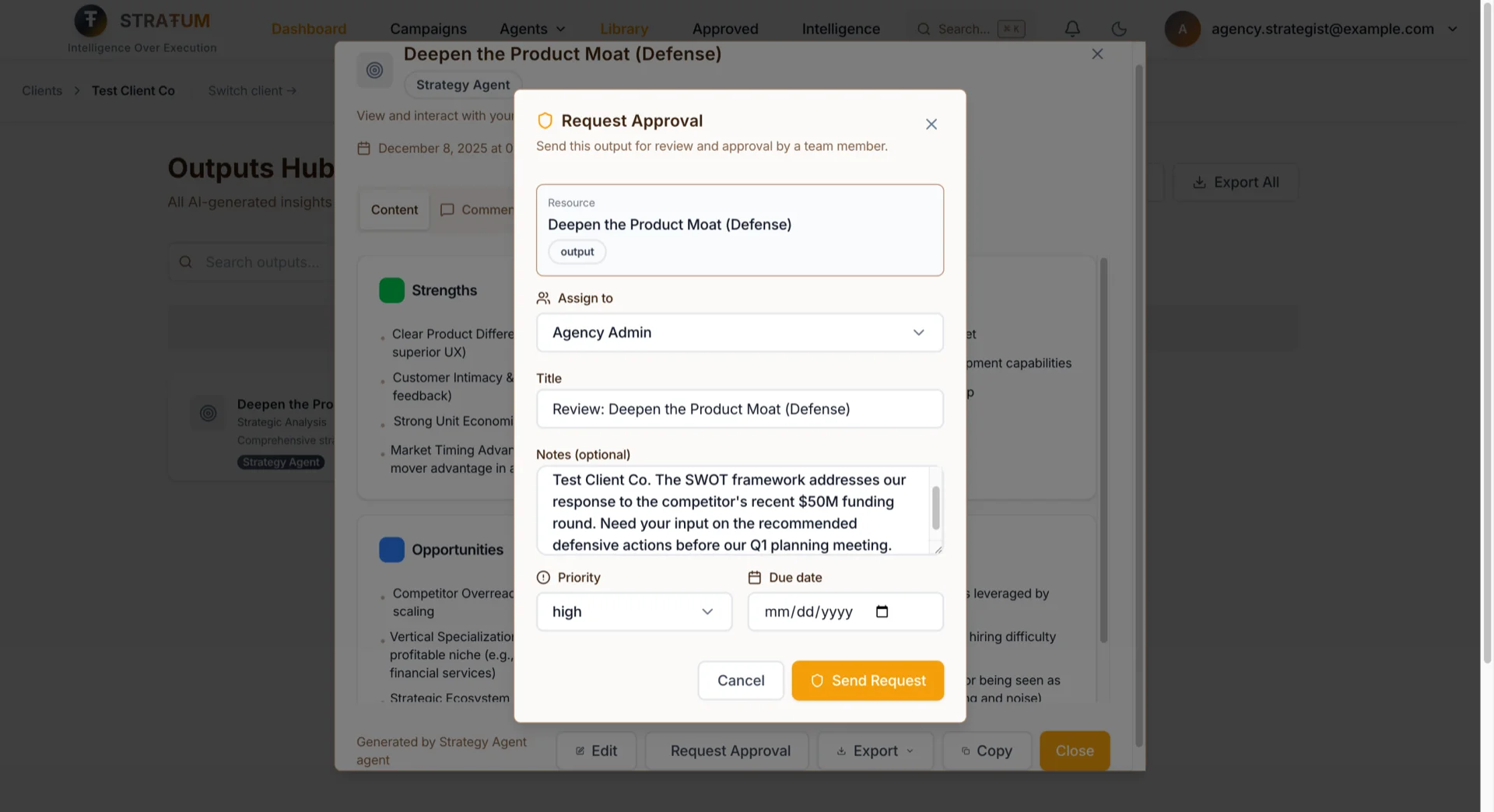
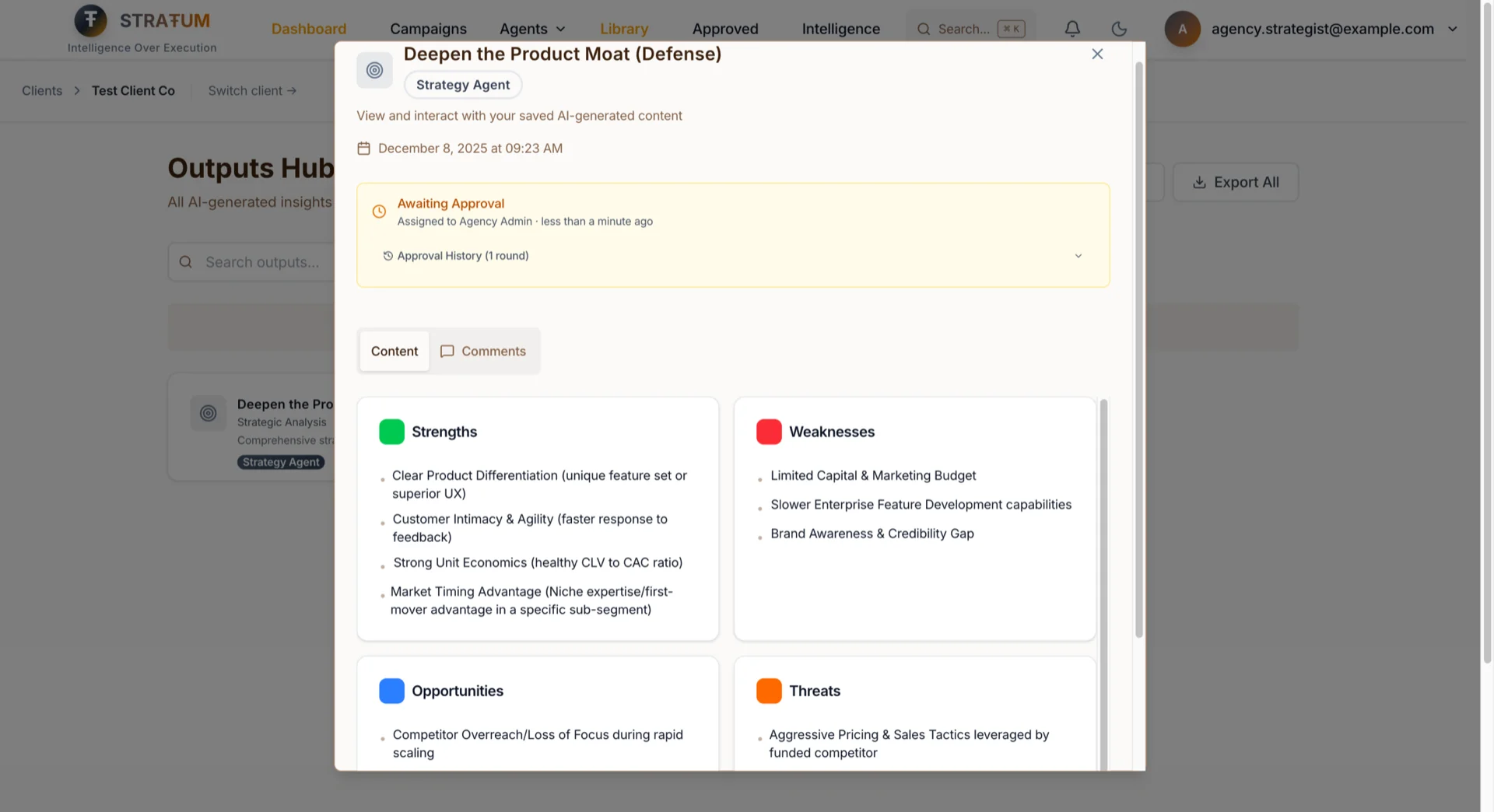
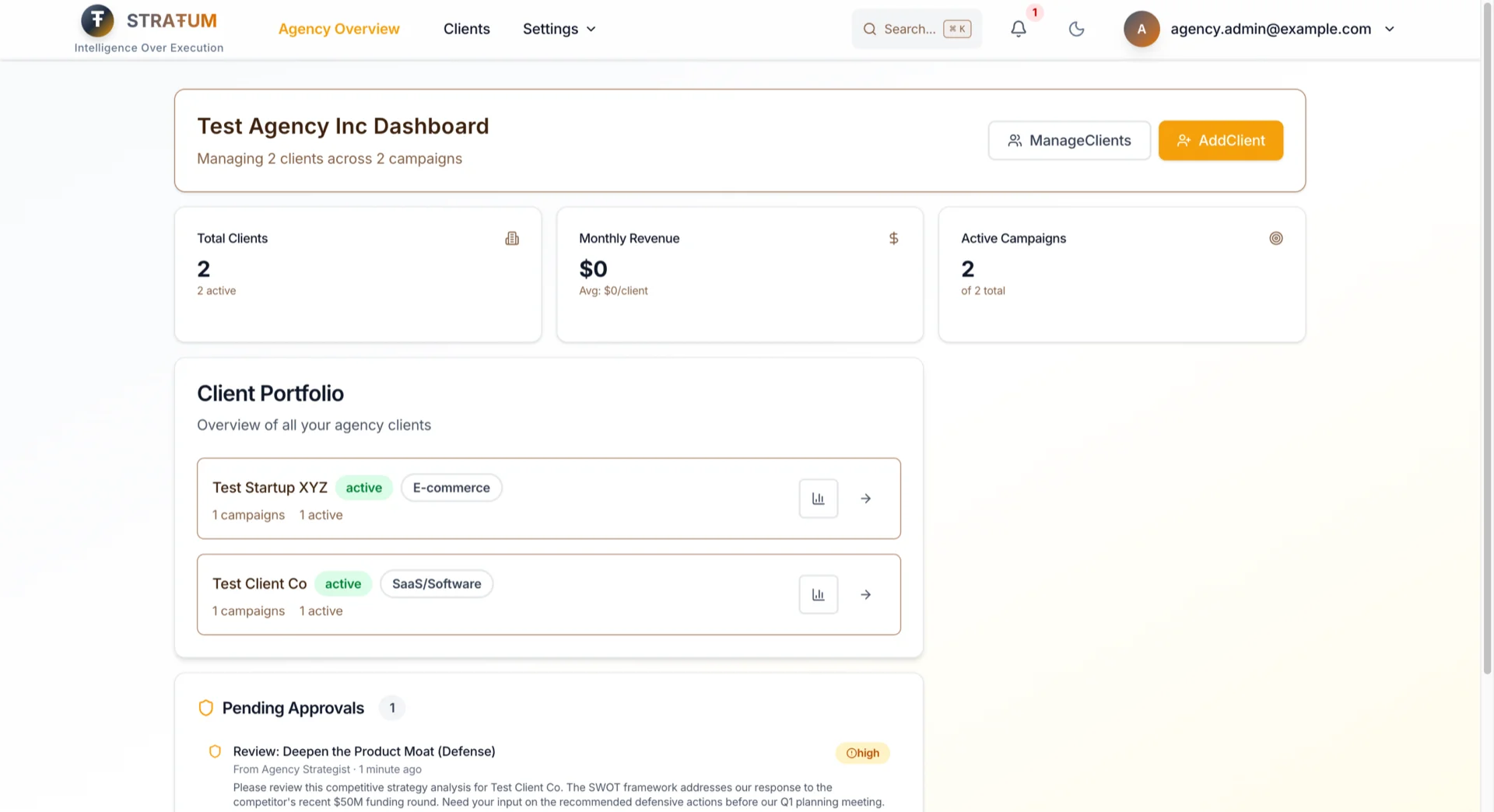
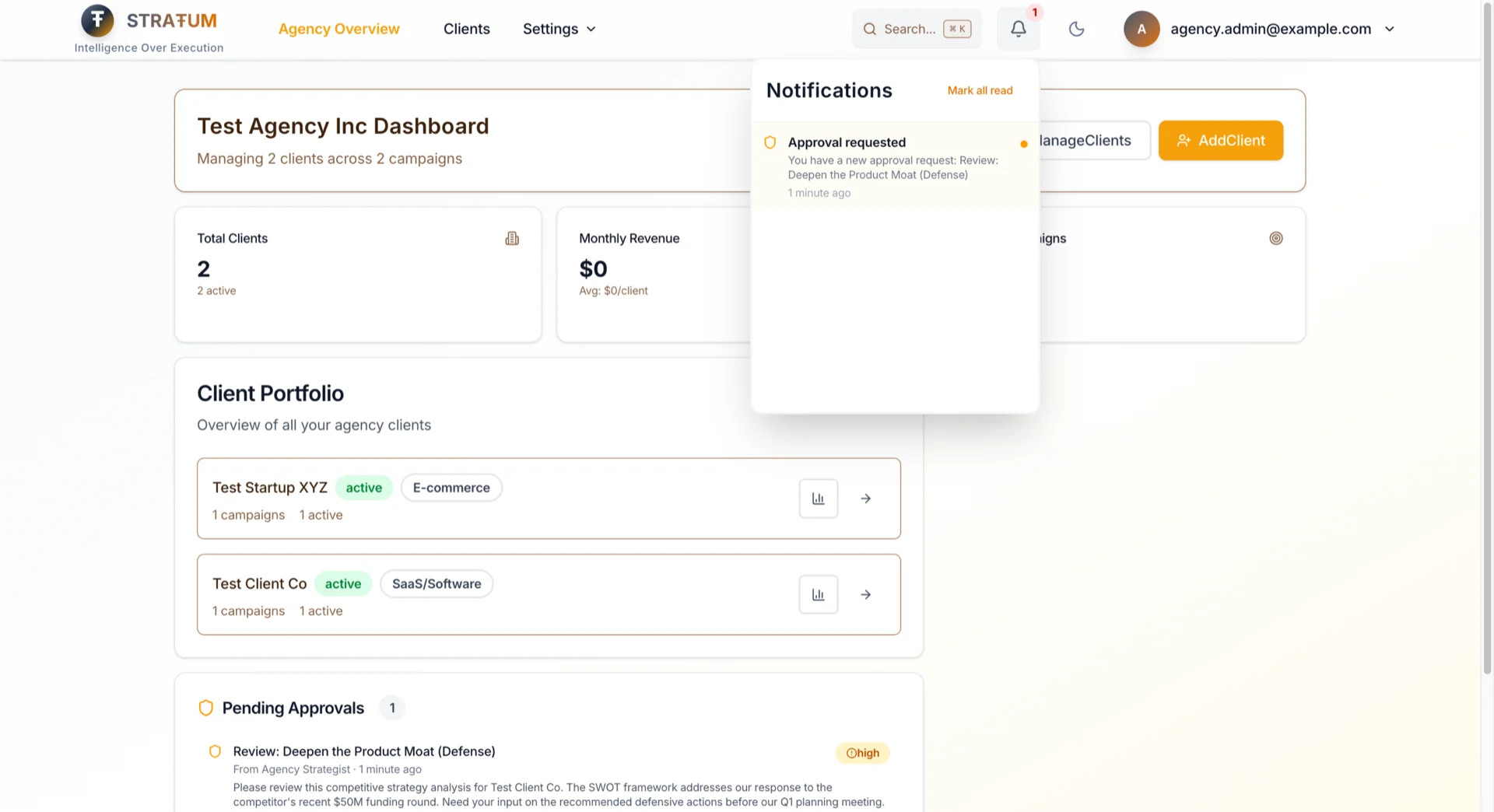
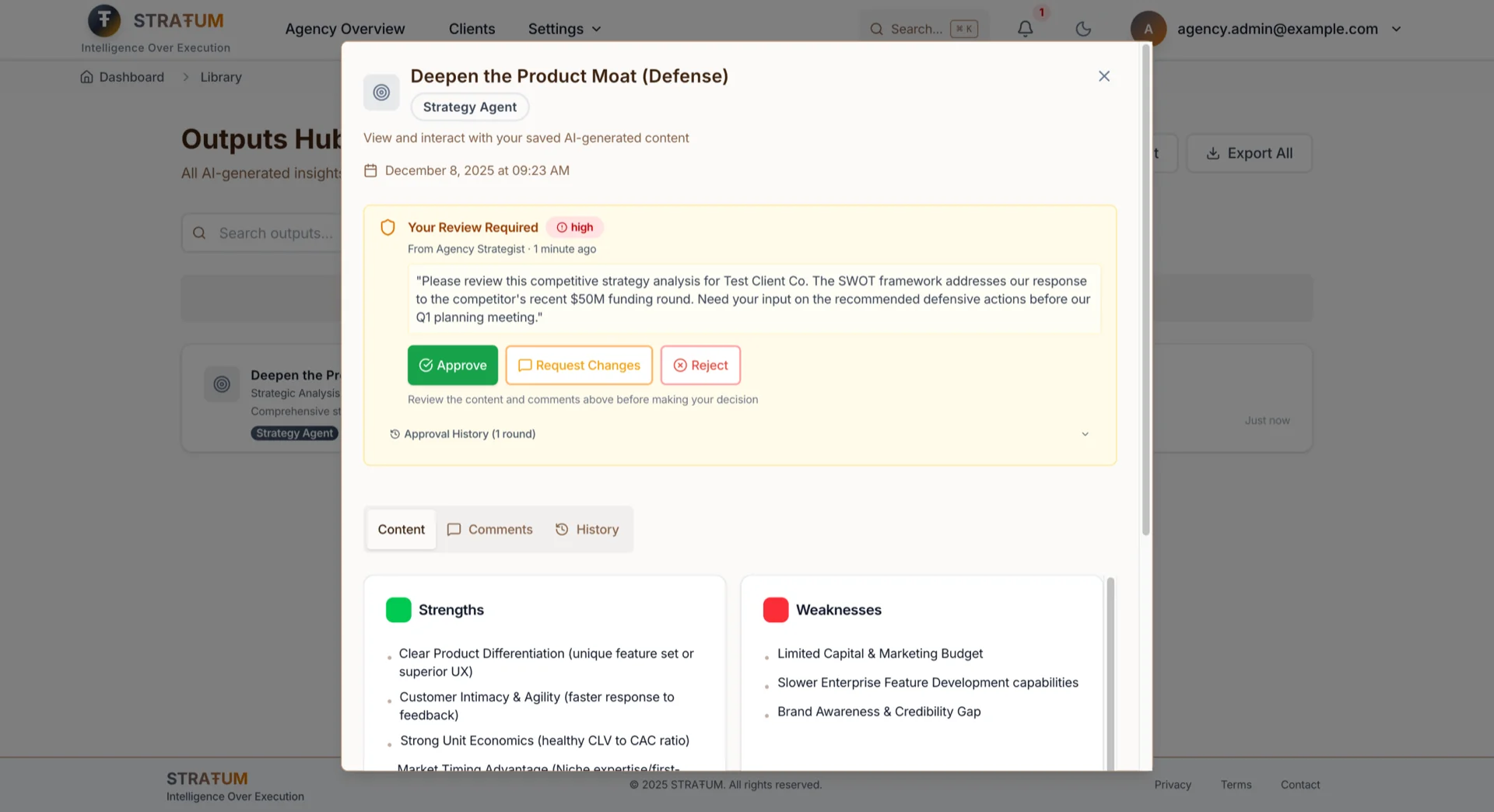
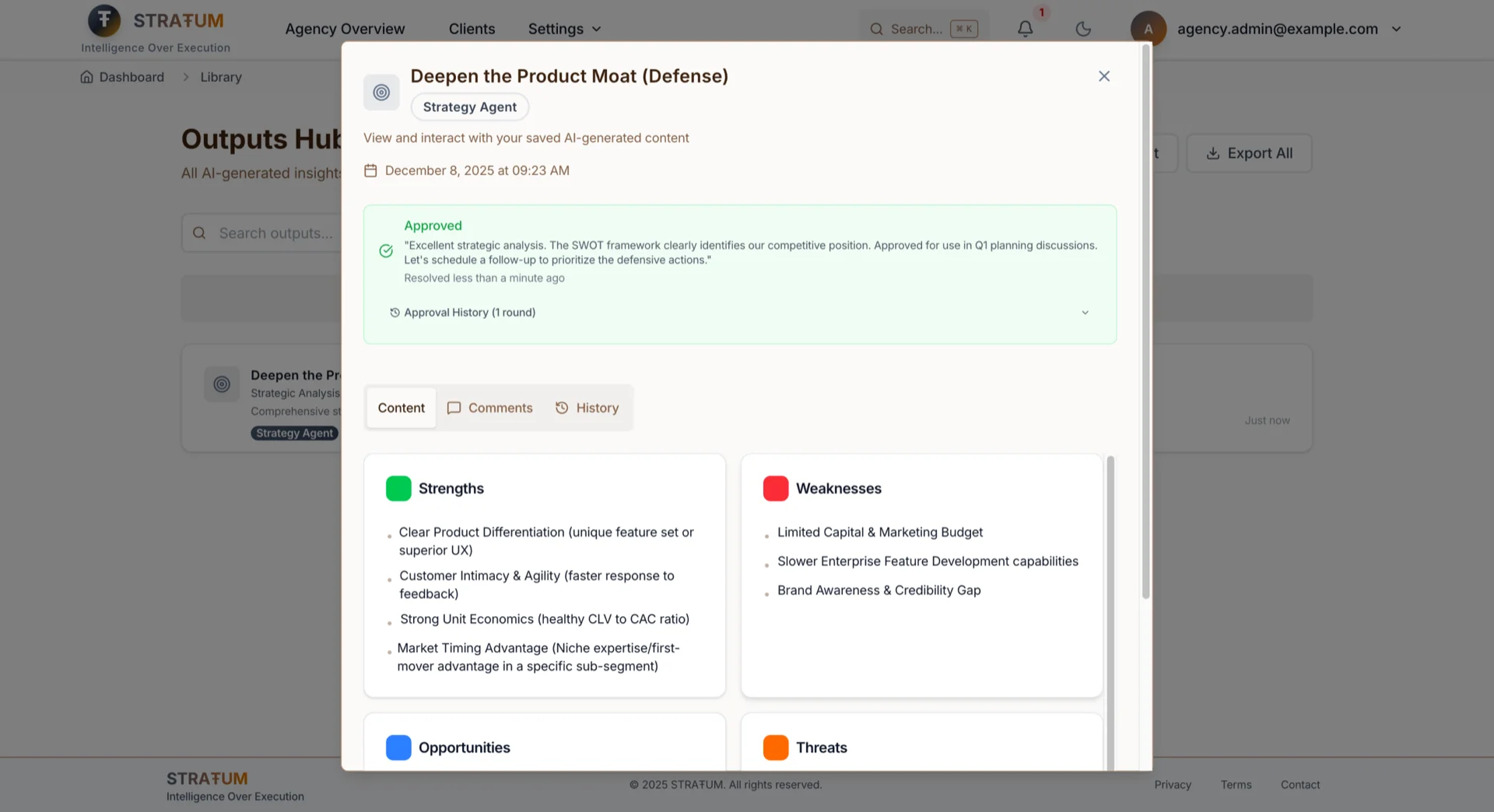
No more Slack threads asking "did you see my email about the Client A copy?"
Comments & @Mentions
Discuss AI-generated work directly on the output—not in Slack threads that get lost.
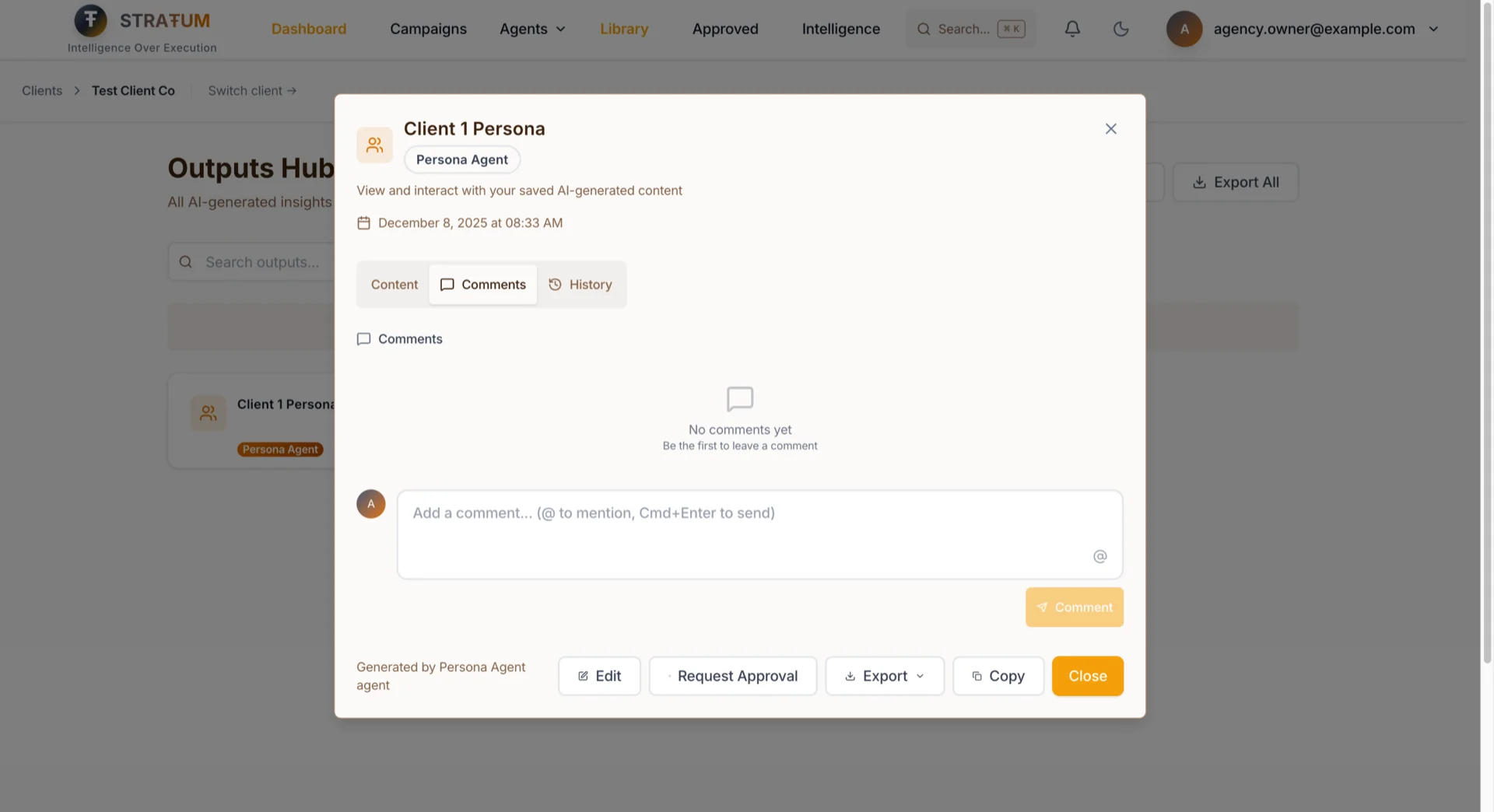
- Threaded comments on any campaign, output, or persona
- @mentions that notify specific team members
- Resolution tracking so you know what's been addressed
- Client-scoped for agencies—freelancers only see comments on their assigned clients
Task Assignments
For SME Marketing Directors: Stop tracking who's doing what in spreadsheets. Assign content creation, reviews, and campaign tasks directly from the output—your team sees their work queue, you see the status.
For Agency Account Managers: Keep client deliverables on track. Assign tasks within your client scope, set priorities and due dates, and know instantly when something's blocked.
How it works:
- Task types: Content creation, review, analysis, campaign setup
- Priority levels: Low, normal, high, urgent
- Due dates with approaching deadline notifications
- Linked resources: Tasks connect to specific campaigns or outputs—no "which document are we talking about?"
- Status tracking: To-do → In progress → Review → Done
Role hierarchy keeps it clean—Account Managers assign within their client scope, Directors can assign to their teams, Owners can assign to anyone.
Real-Time Notifications: Never Miss What Needs Your Attention
For busy Marketing Directors and Agency Owners: Stop checking Slack every 5 minutes wondering if someone needs you. STRATUM tells you exactly when action is required:
- Someone requests your approval → you know immediately
- Your approval request is resolved → no more wondering "did they see it?"
- You're @mentioned in a comment → relevant conversations find you
- A task is assigned to you → it appears in your work queue
- A due date is approaching → you're warned before it's late
Notifications appear in real-time in the app, and roll up into email digests if you miss them.
---
Feature 3: New Hires Productive in 30 Seconds, Not 3 Days
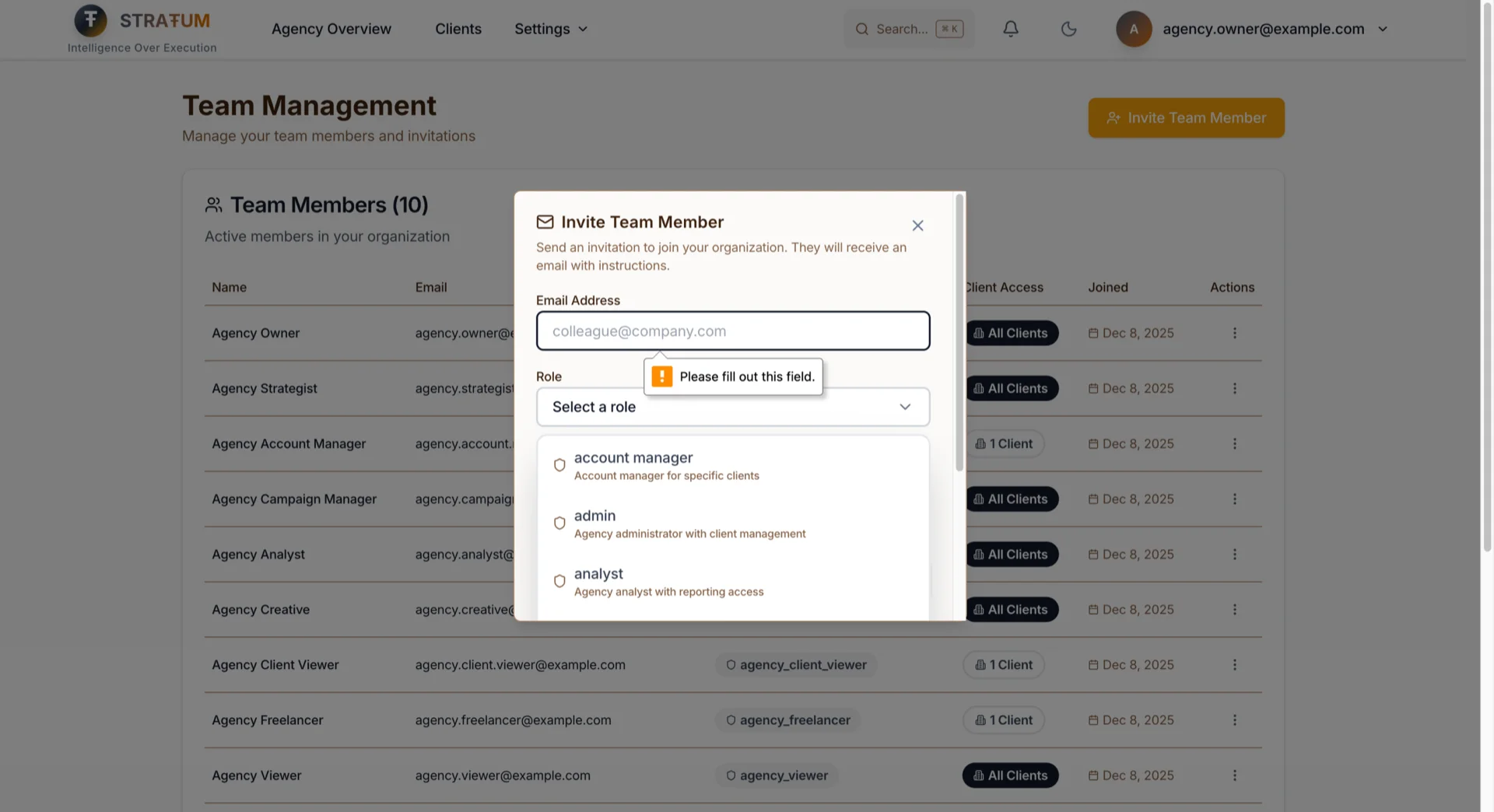
Before: New team member? Here's the process:
1. They sign up separately
2. You email me to manually add them to your org
3. I assign their role in the database
4. They log in and... maybe it works?
Now:
1. Settings → Team → Invite
2. Enter email, pick their role
3. They click the link, set a password
4. They're in. With the right permissions. Immediately.
Why 30 Seconds Matters
For Marketing Directors onboarding a new analyst: they can be productive on day one, not day three.
For Agency owners adding a freelance creative: no IT tickets, no waiting, no "I'll get to it tomorrow."
For Founders bringing on a VA: give them view access in the time it takes to send a Slack message.
The Technical Choice That Made This Possible
Most platforms use email confirmation flows: invite → confirmation email → click link → set password → another confirmation → finally log in.
I skipped the redundant confirmation. If you received the invitation email, you've already proven you own that email address. Why make you prove it twice?
The invitation link is secure, stored on our servers (not in URL parameters where someone could tamper with it), and expires in 7 days. When you accept, everything happens in one step:
1. Your account is created
2. You're added to the right organization
3. Your role permissions are assigned
If anything fails, nothing gets created. No half-finished accounts. No missing permissions. No "I invited them but they can't see anything" support tickets.
---
Defense in Depth: How I Built Data Isolation
I know this section might be more technical than most readers need, but I think it's important to be transparent about how I'm thinking about security — especially for agency users who are trusting me with their client data. I'm still in private alpha, but that doesn't mean I cut corners on architecture. Data isolation was built from day one — not bolted on later. Here's the layered approach:
Layer 1: Database-Level Enforcement (Row Level Security)
Permissions aren't just checked in application code—they're enforced by the database itself using Postgres Row Level Security (RLS). Every query automatically filters by organization. Your analyst can't see another org's data because the database won't return it—regardless of what the application requests.
For client-scoped roles, a second RLS policy filters by assigned clients. An Account Manager for Client A can't access Client B's data even if they craft a direct API request.
Layer 2: Application-Level Permission Checks
The UI respects the same permission rules. If you can't access a client, it doesn't appear in your dashboard. If you can't run an agent, the button is disabled. Navigation, buttons, and pages all check the same permission source—no inconsistencies where the UI shows something the API rejects.
Layer 3: Atomic Transactions
Critical operations like invitation acceptance happen as single database transactions. Create account, add to org, assign role, set client access—all succeed together or all fail together. No half-finished states. No orphaned records.
Layer 4: Server-Side Secrets
Invitation details (organization, role, client assignments) are stored on our servers, referenced by a secure token. The invitation URL contains only the token—tampering with it doesn't grant different access because the actual permissions live in our database.
---
Alpha transparency: We've built these layers deliberately, but we're a small team and STRATUM is still evolving. See our Privacy Policy and Terms for the full picture on what we can and can't guarantee during alpha.
---
Why Build This in Alpha?
Here's the honest answer: because retrofitting team features is brutal.
I've seen companies try to add multi-tenancy after launch. It's a nightmare. Every table needs new columns. Every query needs new filters. Every permission check needs to be rewritten. Data migrations are terrifying.
I built STRATUM with organization-scoped data from Day 2 (that's a story for another post). The architecture was ready for teams. The features just needed to be... built.
Building team features with 50 users means:
- Fast iteration: I can ship, get feedback, and fix in days, not months
- Real usage patterns: I see how teams actually collaborate, not how I imagined they would
- No migration risk: No existing team workflows to break
The alternative—waiting until I had 1,000 users and then saying "surprise, now you need to restructure your entire workflow for teams"—seemed worse.
Try It Now
Team features are live for all STRATUM users.
If you're an existing user:
1. Go to Settings → Team
2. Click "Invite Team Member"
3. Watch them onboard in 30 seconds
If you're new:
Request alpha access at stratum.chandlernguyen.com. Mention "team collaboration" in your request—I'm still in the "talk to every user" phase, and I'd love to walk you through how these features fit your team.
---
The Unconventional Bet
Building team features in alpha is unconventional. Most advice says: get users first, add collaboration later.
But teams are how marketing actually works. The Marketing Director doesn't create strategies alone. The Agency Owner doesn't run client accounts solo. Collaboration isn't a nice-to-have feature—it's how the work gets done.
Building for teams from the start means STRATUM grows with you. Start solo, invite your first teammate when you're ready, scale to a full agency team without switching platforms.
That bet might be wrong. But watching my alpha users screenshot and copy-paste their way around the lack of sharing... I don't think it is.
At the end of the day, building products is about solving real problems for real people — not following a playbook that says "wait until you have 1,000 users." I'd rather build what my 50 users actually need right now than chase a number on a growth chart.
If you're running a marketing team (or an agency), I'd genuinely love to hear how you handle collaboration today. Are you in the "screenshot and paste" camp? The "share one login" camp? Something better? Let me know — I'm still learning and every conversation helps me build this thing better.
Cheers,
Chandler
I'm also building DIALØGUE — if you're curious what happens when I apply the same "build for teams early" thinking to AI podcast generation, check it out.